1. Tutorial
This tutorial will show you how to use this library to do 4D PTV. 4D PTV means Particle Tracking Velocimetry and allows you to tracks particles in space and time in your experiment. For that you need at least 2 cameras but as we will see later, the more camera you have, the better your traking will be. The cameras need to be placed arround your experimental setup in order to see the volume you want to observe from different points of view. If you have more than 2 cameras it is better to place them not in the same plane, but preferently in a pyramidal scheme directed toward the observed volume.
1.1. Required Material
2 (or more) synchronized cameras,
tracers,
a calibration mire: a 2D rigid sheet composed of black/white regularly spaced dots.
your data need to respect the following folder architecture
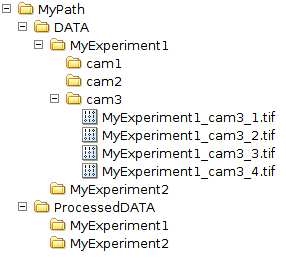
1.2. Required Software
MatlabPythonC++library
All scripts are written in Matlab except for one task (Matching), for which
there are 2 versions written in Python and in C++.
This tutorial is made of three parts: first we will describe the calibration process which is crucial, then the treatment process to obtain particles trajectories, and finally the post-treatment tools we provide in this library.
In this library, we also provide some test data used in this tutorial to show you how does this library work. These test data were obtained using 3 cameras in a Rayleigh-Bénard setup. We provide 100 frames which corresponds to 0.66s of acquisition.