7. Matching
- How does it work?
The “STM” algorithm used in this module have been developed by Mickael Bourgoin and Sander Huisman, and are described in a dedicated paper [BH20]. The main advantages over other methods is that the output does not depend on the order of the input, and scales well with the number of cameras.
Let’s consider again only one particle. If we have N cameras and if the particle is detected by n cameras, we have now \(n\) lines in space. To determine the exact position of the particle, we have to find the closest point to these n lines simultaneously. The simpler method for that would be to take a line and to compute its distance to all other lines. Then taking the closest ones one gets particle position. However, this method would be very computing demanding.
That’s why we follow another method. As a picture is divided into pixels, we divide 3D space into small cubes called voxel. Then, all lines are drawn in this space. For each voxel, the distance between lines which crosses this voxel is computed. If the lines are close enough, a particle is created there. The space division into voxels decreases a lot computations because we only need to compute distance between lines crossing the voxel, which represents a very small number of computations comparing to compute the distance to all other lines.
Besides, very powerful algorithm have been developped to drawn lines on pictures for television application. So the numerical cost to draw lines in a voxel space is very low.
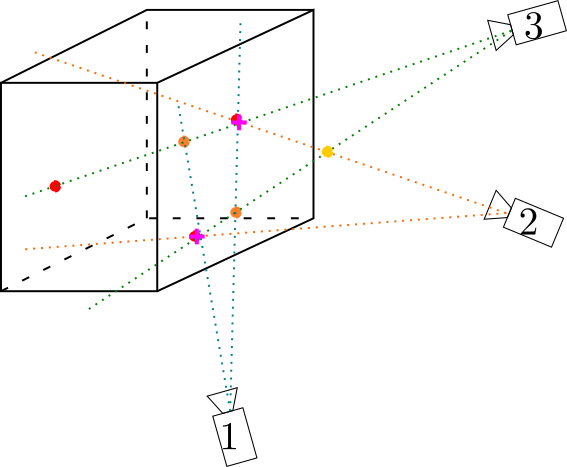
General scheme of matching operation. Particles are localised at rays crossing points. Red particles are real particles, purple ones are ghost particles and yellow one is supressed as it is outside of the measurement volume. Purple crosses show detected particles.
This step has been written in Python and in C++. The Python version
should be as fast as the C++ one. If you track several thousands of
particles, you should take a look at the PSMN part where we show how to
parallelise computations.
- BH20
M. Bourgoin and S. G. Huisman. Using ray-traversal for 3d particle matching in the context of particle tracking velocimetry in fluid mechanics. Rev. Sci. Instrum., 91:085105, 2020. doi:10.1063/5.0009357.
7.1. Python way
7.1.1. Installation
This package requires Python 3.8. The code is accelerated with Transonic and Pythran. Some functions are transpiled to C++ to be very efficient.
You first need to compile the code with the command make. Note that you
need a quite recent C++ compiler (more details here).
With a file ~/.pythranrc containing
[compiler]
CXX=clang++
CC=clang
blas=openblas
one can create a dedicated conda environment and compile the code with:
conda create -y -n env-4dptv python=3.8 pythran transonic clangdev "blas-devel[build=*openblas]"
conda activate env-4dptv
make
To check that it works, you can then run:
make test
make bench
# for this one, the C++ code has to be compiled
make bench_cpp
7.1.2. Usage
The documentation of the script can be obtained with ./stm.py -h, which
gives:
usage: stm.py [-h] [-md1r MIN_DISTANCE_MATCHES_1RAY]
            path_file start_frame stop_frame cam_match max_distance nx ny nz
            max_matches_per_ray [bounding_box]

Space Traversal Matching: compute matches from rays projecting them into voxels.

Example:

export PATH_INPUT_DATA="../../Documentation/TestData/Processed_DATA/MyExperiment/Parallel/Matching/Rays/rays_1-10.dat"
./stm.py $PATH_INPUT_DATA 1 2 2 0.2 400 400 250 2

or (to specify the limits of the visualized region):

./stm.py $PATH_INPUT_DATA 1 2 2 0.2 400 400 250 2 "[[-140, 140], [-150, 150], [5, 170]]"

positional arguments:
path_file             Path towards the file containing the ray data
start_frame           Index of the first frame
stop_frame            Index of the last frame + 1
cam_match             Minimum number of rays crossing to get a match
max_distance          Maximum distance allowed for a match
nx                    Number of voxels in the x direction
ny                    Number of voxels in the y direction
nz                    Number of voxels in the z direction
max_matches_per_ray   Maximum number of matches/ray
bounding_box          Corresponds to the volume visualized [[minX, maxX], [minY, maxY], [minZ, maxZ]]

optional arguments:
-h, --help            show this help message and exit
-md1r MIN_DISTANCE_MATCHES_1RAY, --min-distance-matches-1ray MIN_DISTANCE_MATCHES_1RAY
                        Minimum distance for multiple matches per ray
To run matching on test Data, in a terminal
python stm.py "../../Documentation/TestData/Processed_DATA/MyExperiment/Parallel/Matching/Rays/rays_1-10.dat" 1 10 2 0.2 400 400 250 2
The script creates in the rays folder a file called
matched_cam{cam_match}_{minframe}-{maxframe}.dat which contains all matched
points.
This kind of file can be openned with the Matlab function readmatches.m
[matches,other,params] = readmatches("My4DPTVInstallationPath/Documentation/TestData/Processed_DATA/MyExperiment/matched_cam2_1-100.dat")
matches which is a nmatches x 5 matrix [FrameNumber, x, y, z, Error]
other which is a nmatches x ? matrix [NumberofRaysUsedInMatch, cam0ID,ray0ID,cam1ID,rays1ID,…]
params whose params.nframes gives number of frames and params.nmatches provides number of matches.
Warning
Spatial unit:
The distance unit is fixed during calibration step. Then all distances like maxdistance, bounding_box or particles positions are given in the same unit.
Ghost particles:
On the scheme, one can see orange particles. These particles does not correspond to real particles but they correspond to rays crossing points. These particles are called ghost particles. Setting the parameter maxmatchesperray to one can limit the number of these particles. However, if maxmatchesperray is equal to 1, then when two particles overlap, only one will be detected. That’s why we prefere to set maxmatchesperray to 2. As ghost particles completely disappear between two successive frames, they will be suppressed by the tracking.
Interest of bounding_box:
On the scheme, there is two rays crosses outside of the measurement box (it is the yellow disk). As the bounding_box gives the space limits of measurement volume, this yellow particle is not consider as a match.
7.2. C++ way
Warning
Compilation of C++ code
If you followed the installation process, you have already compiled the C++ code. If not, just do in a terminal
cd 4D-ptv/Matching/STMCpp/
make
The C++ function is STM and it takes 18 arguments:
inputfile (-i): Input file,
output dir (-o): Output directory,
frames (-f): number of frames,
mincameras (-c): minimum number of rays for a match,
maxdistance (-d): maximum distance allowed for a match,
multiplematchesperraymindistance (-s*): minimum allowed distance between matches found for the same ray,
maxmatchesperray (-m): maximum matches per ray,
nx ny nz (-x -y -z): number of voxels in each direction,
boudingbox (-b): bouding box minX maxX minY maxY minZ maxZ.
By defaut, it saves results in a h5 file.
Warning
How to access to STM documentation?
Do in a terminal
./STM -h

Input and output files of STM.cpp function.
with the same meaning than for Python way. The C++ language requires to compile scripts before running them. That is done automatically during the library installation. The compiled version of STM.cpp is STM.
- How to compile
STM.cppfile ? We did a
makefilewhich simplifies everything for you. Before using the 4D-PTV toolbox for the first time, just do:cd My4DPTVInstallationPath/4d-ptv/Matching/STMCpp/ makeThat will compile all
.cppfiles you will need later. The command to compile a classic C++ code is:g++ -std=c++11 -o STM.o STM.cpp
Note
To run STM with test Data:
cd MyPath/4D-PTV/Matching/STMCpp/
./STM -i ../../Documentation/TestData/Processed_DATA/MyExperiment/Parallel/Matching/Rays/rays_1-10.dat -o ../../Documentation/TestData/Processed_DATA/MyExperiment/Parallel/Matching/Rays/ -f 10 -c 2 -d 0.2 -s 1 -m 2 -x 400 -y 400 -z 250 -b -140 140 -150 150 5 170 --hdf5
See also
- STM help:
It is possible to show STM help doing:
./STM -h
- Config file:
The option
--print-configofSTMwill create a config file containing all input parameters.- How to install``g++``?
It is installed by default on Linux. Otherwise:
sudo apt-get install -y build-essential
sudo apt install gcc
Warning
To use PSMN installations see Matching